
If you touch your Screen ?Then how is it works ?Do u want to Know the read the article Below !

by Chris Woodford. Last updated: December 6, 2019.
Once upon a time, the way to get a computer to do something useful was to feed it a stack of cards with holes punched into them. Thankfully, things soon moved on and, by the end of the 20th century, you could get a computer to do things simply by pointing and clicking with a keyboard and a mouse. But the real revolution in making computers easy to use has happened only in the last decade or so—with the arrival of touch-sensitive screens. Most smartphones, ebook readers, and some MP3 players already work with simple, touch controls—and some laptops work that way too. Touchscreens are intuitively easy to use, but how exactly do they work?
How is a touchscreen different from a keyboard?
A touchscreen is a bit like an invisible keyboard glued to the front of your computer monitor. To understand how it works, it helps if you know something about how an ordinary keyboard works first. You can find out about that in our article on computer keyboards, but here's a quick reminder. Essentially, every key on a keyboard is an electrical switch. When you push a key down, you complete an electric circuit and a current flows. The current varies according to the key you press and that's how your computer figures out what you're typing.
Photo: This is the sensitive, switch layer from inside a typical PC keyboard. It rests under the keys and detects when you press them. There are three separate layers of plastic here. Two of them are covered in electrically conducting metal tracks and there's an insulating layer between them with holes in it. The dots you can see are places where the keys press the two conducting layers together. The lines are electrical connections that allow tiny electric currents to flow when the layers are pressed tightly together.
In a bit more detail, here's what happens. Inside a keyboard, you'll find there are two layers of electrically conducting plastic separated by an insulating plastic membrane with holes in it. In fact, there's one hole underneath each key. When you press a key, you push the top conductor layer down towards the bottom layer so the two layers meet and touch through the hole. A current flows between the layers and the computer knows you've pressed a key. Little springy pieces of rubber underneath each key make them bounce back to their original position, breaking the circuit when you release them.
Touchscreens have to achieve something similar to this on the surface on your computer screen. Obviously they can't use switches, membranes, and bits of plastic or they'd block the view of the screen below. So they have to use more cunning tricks for sensing your touch—completely invisibly!

How touchscreens work
Resistive
Capacitive
Infrared
Surface Acoustic Wave
Near field imaging
Light pens
Advantages of touchscreens
Who invented touchscreens?
Different kinds of touchscreen work in different ways. Some can sense only one finger at a time and get extremely confused if you try to press in two places at once. Others can easily detect and distinguish more than one key press at once. These are some of the main technologies:Resistive touchscreens (currently the most popular technology) work a bit like "transparent keyboards" overlaid on top of the screen. There's a flexible upper layer of conducting polyester plastic bonded to a rigid lower layer of conducting glass and separated by an insulating membrane. When you press on the screen, you force the polyester to touch the glass and complete a circuit—just like pressing the key on a keyboard. A chip inside the screen figures out the coordinates of the place you touched.
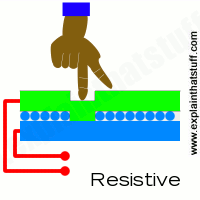
When you press a resistive touchscreen, you push two conducting layers together so they make contact, a bit like an ordinary computer keyboard.
These screens are made from multiple layers of glass. The inner layer conducts electricity and so does the outer layer, so effectively the screen behaves like two electrical conductors separated by an insulator—in other words, a capacitor. When you bring your finger up to the screen, you alter the electrical field by a certain amount that varies according to where your hand is. Capacitive screens can be touched in more than one place at once. Unlike most other types of touchscreen, they don't work if you touch them with a plastic stylus (because the plastic is an insulator and stops your hand from affecting the electric field).
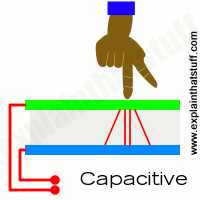
In a capacitive touchscreen, the whole screen is like a capacitor. When you bring your finger up close, you affect the electric field that exists between the inner and outer glass.
Just like the magic eye beams in an intruder alarm, an infraredtouchscreen uses a grid pattern of LEDs and light-detectorphotocells arranged on opposite sides of the screen. The LEDs shine infrared light in front of the screen—a bit like an invisible spider's web. If you touch the screen at a certain point, you interrupt two or more beams. A microchip inside the screen can calculate where you touched by seeing which beams you interrupted. The touchscreen on Sony Reader ebooks (like the one pictured in our photo below) works this way. Since you're interrupting a beam, infrared screens work just as well whether you use your finger or a stylus..
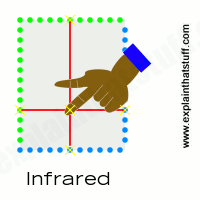 An infrared touchscreen uses the same magic-eye technology that Tom Cruise had to dodge in the movie Mission Impossible. When your fingers move up close, they break invisible beams that pass over the surface of the screen between LEDs on one side and photocells on the other.
Surprisingly, this touchscreen technology detects your fingers using sound instead of light. Ultrasonic sound waves (too high pitched for humans to hear) are generated at the edges of the screen and reflected back and forth across its surface. When you touch the screen, you interrupt the sound beams and absorb some of their energy. The screen's microchip controller figures out from this where exactly you touched the screen.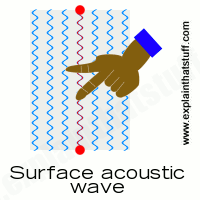
A surface-acoustic wave screen is a bit like an infrared screen, but your finger interrupts high-frequency sound beams rippling over the surface instead of invisible light beams.
Have you noticed how an old-style radio can buzz and whistle if you move your hand toward it? That's because your body affects the electromagnetic field that incoming radio waves create in and around the antenna. The closer you get, the more effect you have. Near field imaging (NFI) touchscreens work a similar way. As you move your finger up close, you change the electric field on the glass screen, which instantly registers your touch. Much more robust than some of the other technologies, NFI screens are suitable for rough-and-tough environments (like military use). Unlike most of the other technologies, they can also detect touches from pens, styluses, or hands wearing gloves.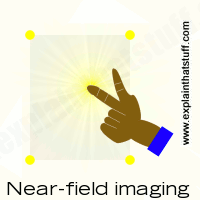
With a near-field imaging screen, small voltages are applied at the corners, producing an electric field on the surface. Your finger alters the field as it approaches.
Light pens were an early form of touchscreen technology, but they worked in a completely different way to modern touchscreens. In old-style computer screens, the picture was drawn by an electronbeam that scanned back and forth, just like in a cathode-ray tube television. The pen contained a photoelectric cell that detected the electron beam as it passed by, sending a signal to the computer down a cable. Since the computer knew exactly where the electron beam was at any moment, it could figure out where the pen was pointing. Light pens could be used either to select menu items or text from the screen (similar to a mouse) or, as shown in the picture here, to draw computer graphics.
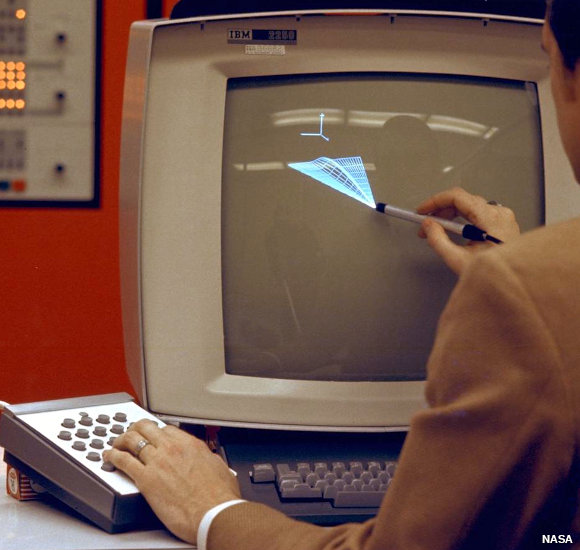 Drawing on a screen with a light pen back in 1973. Although you can't see it from this photo, the light pen is actually connected to the computer by a long electric cable. Photo by courtesy of NASA Ames Research Center (NASA-ARC).
 Photo: Look, no keyboard! The Sony ebook Reader features an infrared touchscreen (described in more detail below). That eliminates the need for a separate keyboard and allows the gadget to be smaller, more portable, and more reliable. You press the screen to turn pages and create bookmarks, and you can use a pop-up on-screen keyboard to make notes in the books you're reading.
The great thing about touchscreen technology is that it's incredibly easy for people to use. Touchscreens can display just as much information (and just as many touch buttons) as people need to complete a particular task and no more, leading people through quite a complex process in a very simple, systematic way. That's why touchscreen technology has proved perfect for public information kiosks, ticket machines at railroad stations, electronic voting machines, self-service grocery checkouts, military computers, and many similar applications where computers with screens and keyboards would be too troublesome to use.
Photo: Touchscreens are widely used in outdoor applications, such as ticket machines at railroad stations and bank ATMs ("cashpoint" machines). Unlike keyboards, they have no moving parts so they're robust: safe, vandal-proof, and weatherproof.
Most of us now own Apple or Android smartphones, which have multi-touch screens. The big advantage here is that the display can show you a screen geared to exactly what you're trying to do with it. If you want to make a phone call, it can display the ordinary digits 0–9 so you can dial. If you want to send an SMS text message, it can display a keyboard (in alphabetical order or typewriter-style QWERTY order, if you prefer). If you want to play games, the display can change yet again. Touchscreen displays like this are incredibly versatile: minute by minute, they change to meet your expectations.
Another big advantage of touchscreens is that they have no moving parts. A normal computer keyboard has 102 keys, so that's 102 plastic keytops, 204 contact points (two per key), and 102 rubber or other springy devices to keep the contacts separate, plus circuit boards, cables, and a lot more besides. You get the picture: hundreds of moving parts and hundreds of things to go wrong. In time, ordinary computer keyboards can and do wear out (laptop keyboards are often very short-lived); touchscreens have no parts, so theoretically they never wear out. They're much easier to clean and more hygienic on things like public ticket machines.

Photo: PC touchscreens are still relatively uncommon, but they're very useful where pointing and dragging makes more sense than typing and clicking. This photo shows a US Navy system called DSIMS (Deployable Ship Integration Multitouch System), used for training people in managing the movements of planes and other equipment onboard aircraft carriers. You simply click a plane and drag it where you want it to move to on the flight deck. But note that the computer still has both a keyboard and a mouse! Photo by John F. Williams courtesy of US Navy.
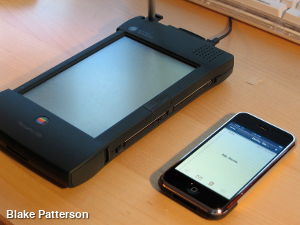
All of us with smartphones, ebook readers, and tablet computers are familiar with touchscreen technology, but touch-based PCs and laptops are still fairly uncommon. Way back in 2008, Microsoft announced that touch technologies would feature prominently in future versions of the Windows operating system—potentially making computer mice and keyboards obsolete. Four years later, it unveiled its Surface range of laptops with smart built-in touchscreens, but sales have beenconsistently disappointing. Though most of us swipe away at our smartphones and tablets every day of our lives, we're still largely locked into our old-style desktop computers and operating systems, and the old ways of using them—namely keyboards and mice. Maybe touch technology simply makes more sense for some applications than others? Time will tell...
Automobiles, airplanes, computers, and steam engines—touchscreens belong in the company of these illustrious inventions because they lack a unique inventor and a definitive, "Eureka" moment of invention: in other words, no single man or woman invented the touchscreen.
The first invention that bears any kind of resemblance to using a modern touchscreen was called a light pen (featured in the photo up above), a stylus with a photocell in one end, and a wire running into the computer at the other end, that could draw graphics on a screen. It was developed in the early 1950s and formed a part of one of the first computer systems to feature graphics, Project Whirlwind. Light pens didn't really work like modern touchscreens, however, because there was nothing special about the screen itself: all the clever stuff happened inside the pen and the computer it was wired up to.
During the 1960s and early 1970s, another key strand in the development of touchscreens came from the work of computer scientists who specialized in a field called human-computer interaction (HCI), which sought to bridge the gap between people and computers. Among them were Douglas Engelbart, inventor of the computer mouse; Ivan Sutherland, a pioneer of computer graphics and virtual reality; and Alan Kay, a colleague of Sutherland's who helped to pioneer the graphical user interface (or GUI—the picture-based desktop used on virtually all modern computers).
The first gadget that worked in any way like a modern touchscreen was called a "Discriminating Contact Sensor," and it was patented on October 7, 1975 by George S. Hurst and William C. Colwell of Elographics, Inc. Much like a modern resistive touchscreen, it was a device with two electrically conducting contact layers separated by an insulating layer that you could press together with a pen. Crucially, it was designed to be operated "with a writing instrument [the patent drawings show a pen] and not by any portion of a writer's hand". So it wasn't like a modern, finger-operated touchscreen device.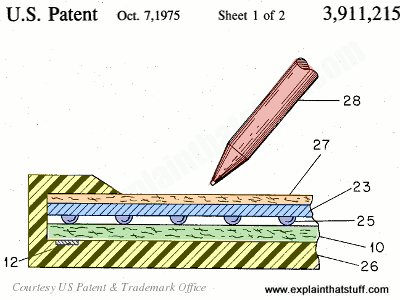 Photo: Artwork:
This early touchscreen by Elographics was patented in 1975. It has an outer case (26, yellow) and a top contact layer (27, orange) on which you can write with anything you like (28). As you scribble away, you press the top contact layer (blue, 23) down onto the bottom one (10, green) by squashing the small, well-spaced insulator buttons (dark blue, 25). An electrode (12) picks up the contact and uses resistance to figure out which part of the screen you've touched. From US Patent #3,911,215: Discriminating Contact Sensor by George S. Hurst and William C. Colwell, Elographics, Inc., courtesy of US Patent and Trademark Office.Many people
Comments
Post a Comment
Please do not enter spam links and don't use unparliament language .